Showing posts with label debug. Show all posts
Showing posts with label debug. Show all posts
Friday, January 29, 2010


Friday, June 20, 2008
Remote debugging Tomcat with Eclipse
1. Конфа для старта сервака
Для Linux
Для Tomkat'a изменяем скрипт запуска eXo.sh (для других сервакох делается аналогично)
Закомментируем ненужное:
#JPDA_TRANSPORT=dt_socket #JPDA_ADDRESS=8000
#REMOTE_DEBUG="-Xdebug -Xrunjdwp:transport=dt_socket,address=8000,server=y,suspend=n"
Главное прописать вот эту строчку:
Добавляем эти опции в конец джава параметров запуска:
JAVA_OPTS="$YOURKIT_PROFILE_OPTION $JAVA_OPTS $LOG_OPTS $SECURITY_OPTS $EXO_OPTS $EXO_CONFIG_OPTS $JPDA_OPTS"
exec catalina.sh "$@"
Для Windows
Для Tomkat'a изменяем скрипт запуска eXo.bat (для других сервакох делается аналогично)
Главное прописать вот это:
set JPDA_TRANSPORT=dt_socket
set JPDA_ADDRESS=8000
set JPDA_SUSPEND=y
set JPDA_OPTS=-Xdebug -Xrunjdwp:transport=%JPDA_TRANSPORT%,address=%JPDA_ADDRESS%,server=y,suspend=%JPDA_SUSPEND%
call catalina.bat %*
2. Старт сервака
Для Linux:
./eXo.sh run
Для Windows:
./eXo.bat jpda run
Если все ок, то увидете приглашение для старта дебага:
"Listening for transport dt_socket at address: 8000"
3. Запуск дебага в Eclipse

Для Linux
Для Tomkat'a изменяем скрипт запуска eXo.sh (для других сервакох делается аналогично)
Закомментируем ненужное:
#JPDA_TRANSPORT=dt_socket
#REMOTE_DEBUG="-Xdebug -Xrunjdwp:transport=dt_socket,address=8000,server=y,suspend
Главное прописать вот эту строчку:
JPDA_OPTS="-Xdebug -Xrunjdwp:transport=dt_socket,address=8000,server=y,suspend=y"
Добавляем эти опции в конец джава параметров запуска:
JAVA_OPTS="$YOURKIT_PROFILE
exec catalina.sh "$@"
Для Windows
Для Tomkat'a изменяем скрипт запуска eXo.bat (для других сервакох делается аналогично)
set JPDA_TRANSPORT=dt_socket
set JPDA_ADDRESS=8000
set JPDA_SUSPEND=y
set JPDA_OPTS=-Xdebug -Xrunjdwp:transport=%JPDA_TRANSPORT%,address=%JPDA_ADDRESS%,server=y,suspend=%JPDA_SUSPEND%
2. Старт сервака
Для Linux:
./eXo.sh run
Для Windows:
./eXo.bat jpda run
Если все ок, то увидете приглашение для старта дебага:
"Listening for transport dt_socket at address: 8000"
3. Запуск дебага в Eclipse

Tuesday, May 27, 2008
Tomcat for Eclipse
Tomcat launcher Eclipse plugin for debud
Home page
Download page
Direct download (ver. 3.2.1) !
Comments for tomcat plugin
Tomcat Tutorial: HelloWorld for Complete Fools
Documentation (translated with google)
Read before, note: replace my tomcat home "/home/alexey/java/exo-working/exo-tomcat" with your's.
1. Install
Unpack it to eclipse/plugins dir.
Start or restart Eclipse.
Be sure that you see the new tomcat panel.
2. Configure
Configure plugin under eclipse
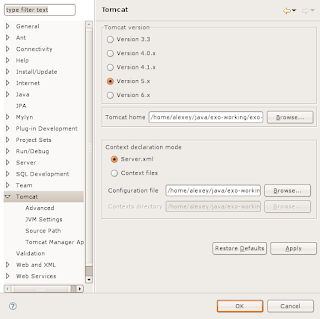
Window -> Preferences... -> Tomcat:
2.1
Set version of your tomcat (e.g.: 5.x)
Set tomcat home (e.g.: /home/alexey/java/exo-working/exo-tomcat)
Context declaration mode: Server.xml
2.2 Advanced
Set tomcat base (e.g.: /home/alexey/java/exo-working/exo-tomcat)
Check projects for "Add java projects to tomcat classspath" (e.g.: Select All)
2.3 JVMSettings
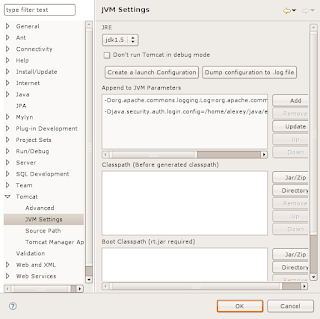
In section "Append to JVM Parameters" add both:
"-Dorg.apache.commons.logging.Log=org.apache.commons.logging.impl.SimpleLog"
"-Djava.security.auth.login.config=/home/alexey/java/exo-working/exo-tomcat/conf/jaas.conf"
2.4 Source Path
Manually select or check "Automatically compute source path"
Click "Apply" and "OK".
3. Use
Set launch configuration.
"Run" -> "Open Debug Dialog..." -> Double click on "Java Application" for creating new configuration.
Tabs:
3.1 Main
Type in the field "Name" launch configuration name (e.g.: Tomcat5).
Choose "Project" (e.g. Portal)
Set in the "Main class" value "org.apache.catalina.startup.Bootstrap"
3.2 Arguments
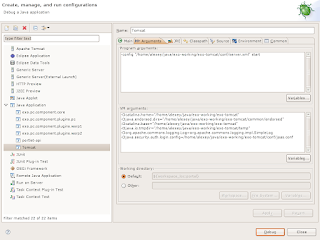
Program arguments:
-config "/home/alexey/java/exo-working/exo-tomcat/conf/server.xml" start
VM arguments:
-Dcatalina.home="/home/alexey/java/exo-working/exo-tomcat"
-Djava.endorsed.dirs="/home/alexey/java/exo-working/exo-tomcat/common/endorsed"
-Dcatalina.base="/home/alexey/java/exo-working/exo-tomcat"
-Djava.io.tmpdir="/home/alexey/java/exo-working/exo-tomcat/temp"
-Dorg.apache.commons.logging.Log=org.apache.commons.logging.impl.SimpleLog
-Djava.security.auth.login.config=/home/alexey/java/exo-working/exo-tomcat/conf/jaas.conf
3.3 JRE
Skip
3.4 Classpath
Remove user entries projects jars to avoid some strange exceptions while the tomcat is starting.
Add two jars to the "User Entries"
"tools.jar" from JAVA_HOME/lib
"bootstrap.jar" from TOMCAT_HOME/bin
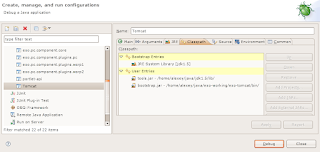
3.5 Source
Skip
Click "Apply" and "Debug"
Home page
Download page
Direct download (ver. 3.2.1) !
Comments for tomcat plugin
Tomcat Tutorial: HelloWorld for Complete Fools
Documentation (translated with google)
Read before, note: replace my tomcat home "/home/alexey/java/exo-working/exo-tomcat" with your's.
1. Install
Unpack it to eclipse/plugins dir.
Start or restart Eclipse.
Be sure that you see the new tomcat panel.

2. Configure
Configure plugin under eclipse
Window -> Preferences... -> Tomcat:
2.1
Set version of your tomcat (e.g.: 5.x)
Set tomcat home (e.g.: /home/alexey/java/exo-working/exo-tomcat)
Context declaration mode: Server.xml

2.2 Advanced
Set tomcat base (e.g.: /home/alexey/java/exo-working/exo-tomcat)
Check projects for "Add java projects to tomcat classspath" (e.g.: Select All)
2.3 JVMSettings
In section "Append to JVM Parameters" add both:
"-Dorg.apache.commons.logging.Log=org.apache.commons.logging.impl.SimpleLog"
"-Djava.security.auth.login.config=/home/alexey/java/exo-working/exo-tomcat/conf/jaas.conf"

2.4 Source Path
Manually select or check "Automatically compute source path"
Click "Apply" and "OK".
3. Use
Set launch configuration.
"Run" -> "Open Debug Dialog..." -> Double click on "Java Application" for creating new configuration.
Tabs:
3.1 Main
Type in the field "Name" launch configuration name (e.g.: Tomcat5).
Choose "Project" (e.g. Portal)
Set in the "Main class" value "org.apache.catalina.startup.Bootstrap"
3.2 Arguments
Program arguments:
-config "/home/alexey/java/exo-working/exo-tomcat/conf/server.xml" start
VM arguments:
-Dcatalina.home="/home/alexey/java/exo-working/exo-tomcat"
-Djava.endorsed.dirs="/home/alexey/java/exo-working/exo-tomcat/common/endorsed"
-Dcatalina.base="/home/alexey/java/exo-working/exo-tomcat"
-Djava.io.tmpdir="/home/alexey/java/exo-working/exo-tomcat/temp"
-Dorg.apache.commons.logging.Log=org.apache.commons.logging.impl.SimpleLog
-Djava.security.auth.login.config=/home/alexey/java/exo-working/exo-tomcat/conf/jaas.conf

3.3 JRE
Skip
3.4 Classpath
Remove user entries projects jars to avoid some strange exceptions while the tomcat is starting.
Add two jars to the "User Entries"
"tools.jar" from JAVA_HOME/lib
"bootstrap.jar" from TOMCAT_HOME/bin

3.5 Source
Skip
Click "Apply" and "Debug"
Tuesday, October 2, 2007
[SOLVED] eclipse tomcat debug ClassNotFoundException URLClassLoader
Need to add jars.
In the Eclipse to the "Run" -> "Open Debug Dialog..." -> Java Application -> your launch configuration -> "Classpath" Tab -> User Entries
Add two jars:
"tools.jar" from JAVA_HOME/lib
"bootstrap.jar" from TOMCAT_HOME/bin
In the Eclipse to the "Run" -> "Open Debug Dialog..." -> Java Application -> your launch configuration -> "Classpath" Tab -> User Entries
Add two jars:
"tools.jar" from JAVA_HOME/lib
"bootstrap.jar" from TOMCAT_HOME/bin
Subscribe to:
Posts (Atom)
