Tomcat launcher Eclipse plugin for debudHome pageDownload pageDirect download (ver. 3.2.1) !Comments for tomcat pluginTomcat Tutorial: HelloWorld for Complete FoolsDocumentation (translated with google)Read before, note: replace my tomcat home "/home/alexey/java/exo-working/exo-tomcat" with your's.
1. InstallUnpack it to eclipse/plugins dir.
Start or restart Eclipse.
Be sure that you see the new tomcat panel.
 2. Configure
Configure plugin under eclipse
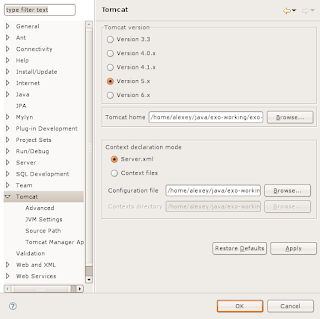
Window -> Preferences... -> Tomcat:
2.1
Set version of your tomcat (e.g.: 5.x)
Set tomcat home (e.g.: /home/alexey/java/exo-working/exo-tomcat)
Context declaration mode: Server.xml
2.2 Advanced
Set tomcat base (e.g.: /home/alexey/java/exo-working/exo-tomcat)
Check projects for "Add java projects to tomcat classspath" (e.g.: Select All)
2.3 JVMSettings
In section "Append to JVM Parameters" add both:
"-Dorg.apache.commons.logging.Log=org.apache.commons.logging.impl.SimpleLog"
"-Djava.security.auth.login.config=/home/alexey/java/exo-working/exo-tomcat/conf/jaas.conf"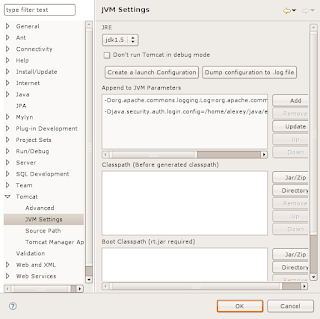
2.4 Source Path
Manually select or check "Automatically compute source path"
Click "Apply" and "OK".
3. UseSet launch configuration.
"Run" -> "Open Debug Dialog..." -> Double click on "Java Application" for creating new configuration.
Tabs:
3.1 Main
Type in the field "Name" launch configuration name (e.g.: Tomcat5).
Choose "Project" (e.g. Portal)
Set in the "Main class" value "org.apache.catalina.startup.Bootstrap"
3.2 Arguments
Program arguments:
-config "/home/alexey/java/exo-working/exo-tomcat/conf/server.xml" startVM arguments:
-Dcatalina.home="/home/alexey/java/exo-working/exo-tomcat"
-Djava.endorsed.dirs="/home/alexey/java/exo-working/exo-tomcat/common/endorsed"
-Dcatalina.base="/home/alexey/java/exo-working/exo-tomcat"
-Djava.io.tmpdir="/home/alexey/java/exo-working/exo-tomcat/temp"
-Dorg.apache.commons.logging.Log=org.apache.commons.logging.impl.SimpleLog
-Djava.security.auth.login.config=/home/alexey/java/exo-working/exo-tomcat/conf/jaas.conf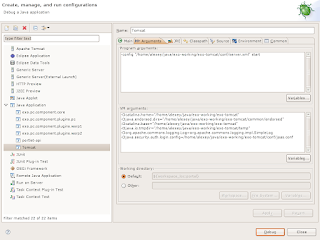
3.3 JRE
Skip
3.4 Classpath
Remove user entries projects jars to avoid some strange exceptions while the tomcat is starting.
Add two jars to the "User Entries"
"tools.jar" from JAVA_HOME/lib
"bootstrap.jar" from TOMCAT_HOME/bin
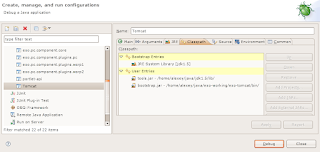
3.5 Source
Skip
Click "Apply" and "Debug"


