Problem:
[INFO] ------------------------------------------------------------------------
[ERROR] BUILD ERROR
[INFO] ------------------------------------------------------------------------
[INFO] 'jar-no-fork' was specified in an execution, but not found in the plugin
Solution:
To install the maven version 2.2.1
Monday, September 21, 2009


Wednesday, September 16, 2009
Eclipse Galileo 3.5
1. Install Eclipse.
Download eclipse-jee-galileo-linux-gtk.tar.gz from:
http://www.eclipse.org/downloads/download.php?file=/technology/epp/downloads/release/galileo/R/eclipse-jee-galileo-linux-gtk.tar.gz
tar -zxvf eclipse-jee-galileo-linux-gtk.tar.gz
2. Install Subversive.
2.1. Install subversion for Ubuntu https://launchpad.net/~anders-kaseorg/+archive/subversion-1.6
The list of all dependencies for Ubuntu 9.04 is here https://launchpad.net/~anders-kaseorg/+archive/subversion-1.6/+build/1200532
for install it use "
Add update site
http://download.eclipse.org/technology/subversive/0.7/update-site/
Now you can install only Subversive SVN Team Provider.
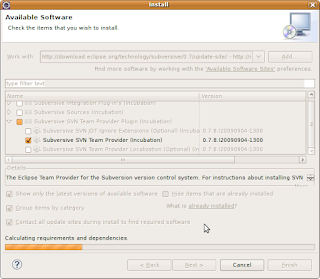
After restart eclipse go to Window -> Preferences -> Team -> SVN
on the first call to any Subversive functionality the Connector Discovery feature will detect that there are no connectors installed and will launch a dialog which displays the SVN Connectors you need and enables download and installation:
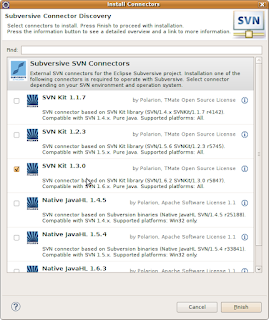
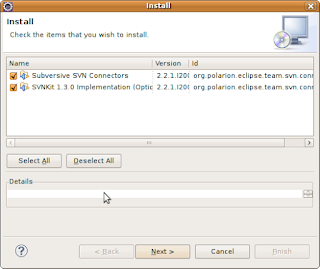 2.3. Use share project.
Click right-button mouse on project and select Team -> Share Project SVN, Next, Next,
Enter user/password, check Save password, Finish
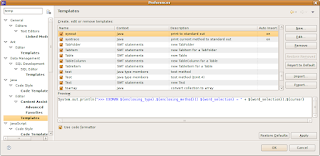
3. Configure JRE, Classpath variables, Formatter and Templates
JRE
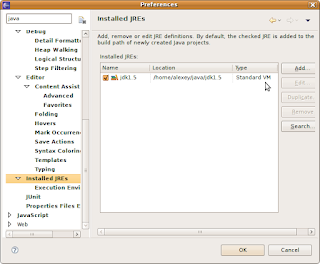
Classpath variables are configured at
Window -> Preferences -> Java -> Build Path -> Classpath variable
Click NEW to add maven repo "M2_REPO" variable.
Formatter
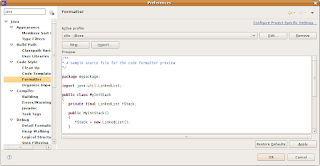
Templates
Links:
1. How to use maven for eclipse
2. How to debug tomcat with eclipse
Download eclipse-jee-galileo-linux-gtk.tar.gz from:
http://www.eclipse.org/downloads/download.php?file=/technology/epp/downloads/release/galileo/R/eclipse-jee-galileo-linux-gtk.tar.gz
tar -zxvf eclipse-jee-galileo-linux-gtk.tar.gz
2. Install Subversive.
2.1. Install subversion for Ubuntu https://launchpad.net/~anders-kaseorg/+archive/subversion-1.6
The list of all dependencies for Ubuntu 9.04 is here https://launchpad.net/~anders-kaseorg/+archive/subversion-1.6/+build/1200532
for install it use "
gksudo gdebi -i package_name.deb2.2. Install subversion for Eclipse
or
sudo dpkg -i package_name.deb
Add update site
http://download.eclipse.org/technology/subversive/0.7/update-site/
Now you can install only Subversive SVN Team Provider.

After restart eclipse go to Window -> Preferences -> Team -> SVN
on the first call to any Subversive functionality the Connector Discovery feature will detect that there are no connectors installed and will launch a dialog which displays the SVN Connectors you need and enables download and installation:

 2.3. Use share project.
Click right-button mouse on project and select Team -> Share Project SVN, Next, Next,
Enter user/password, check Save password, Finish
3. Configure JRE, Classpath variables, Formatter and Templates
JRE

Classpath variables are configured at
Window -> Preferences -> Java -> Build Path -> Classpath variable
Click NEW to add maven repo "M2_REPO" variable.
Formatter

Templates

Links:
1. How to use maven for eclipse
2. How to debug tomcat with eclipse
Tuesday, September 15, 2009
[SOLVED] to disable Checking file systems
To disable annoying delay for several minutes to boot ubuntu with "Checking file systems"
This is controlled by the last column in /etc/fstab. If that value is non-zero, say 1 or 2, that filesystem will be checked on startup.
This is controlled by the last column in /etc/fstab. If that value is non-zero, say 1 or 2, that filesystem will be checked on startup.
Subscribe to:
Posts (Atom)
